

Your sidechain is working, the kick ducks the bass on every beat, and the low end still sounds like a blanket. That is not a compression problem. A compressor shapes dynamics over time; it does not set the static relationship between two sources. If the average level of your bass is wrong relative to the kick, sidechain just makes the wrong balance rhythmic.
This post is about fixing the balance first — with a meter, with numbers, before any dynamics processing touches the signal.
Why a Compressor Won’t Fix a Level Error
A compressor answers one question: what happens when the signal exceeds a threshold. It cannot answer “how loud should this element sit in the mix.” That is a fader decision.
When bass is 2 dB too hot, a sidechain compressor pulls it down for 100–200 ms after each kick and then lets it right back up to the wrong level. You get a pumping blur instead of a static blur. The energy between kicks is still too high, the low end still masks everything above it, and you end up pushing the ratio and the gain reduction higher to compensate — which audibly destroys the bass sustain that trance depends on.
Keep the two decisions separate. Level decisions are made with the fader. Dynamic decisions are made with the compressor. If you find yourself adjusting compressor settings to change how loud something feels, you are solving a fader problem with the wrong tool.
Where Gain Gets Added in the Chain
Blurry low end is rarely one big mistake. It is three or four small gain increases stacked on top of each other: a sample that was already mastered loud, a saturator that adds 3 dB of makeup, a 2 dB shelf boost at 60 Hz “for weight,” a fader nudged up because the kick got quieter after the EQ, and a bus that sums two correlated sources into something 5 dB hotter than either.

Every arrow in that chain can add gain. Start measuring at the input, not at the output. If you only read the master meter, you learn that something is too loud but not which stage did it.
Setting a Reference Level for the Kick
The kick is the anchor of a trance mix. Everything else is placed relative to it, so it needs a fixed, repeatable output level that does not drift when you swap plugins.
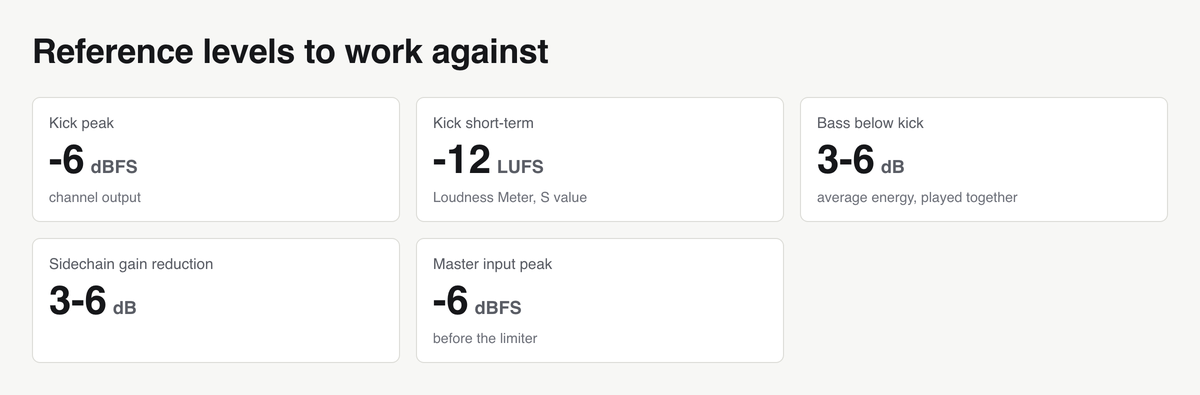
A workable target: peak around -6 dBFS, short-term average around -12 LUFS at the channel output. These numbers are not magic, they are headroom arithmetic. A kick peaking at -6 dBFS leaves room for the bass, the leads, and the pads to sum on the bus without the master input running hot. By the time twenty channels have been summed, that -6 dB of per-channel headroom is what keeps your limiter working as a safety device rather than as a mix element.
Set this once, with every plugin on the channel bypassed except the ones you consider part of the sound. Then, when you add a saturator or an EQ later, use its output trim to return to the same reading. The reference level stays constant; the processing changes around it.
Peak or Average: What to Actually Measure
A kick is a transient. A bass is continuous energy. Comparing them on the same peak meter is a category error — the kick will always show a higher number while the bass carries more energy over the bar.
Measure them differently:
- Kick: peak. In Logic, the channel strip meter in Peak mode, or the Level Meter plugin, tells you whether the transient is where you want it.
- Bass: average. Use the Loudness Meter and read the Short-term (S) value, which averages over 3 seconds, or a Level Meter set to RMS. Momentary is too jumpy to make a balance decision with; Integrated is a whole-track number and useless for a loop.
The balance decision is made on average energy. The peak reading only tells you how close you are to clipping.
Placing the Bass by Numbers, Not by Ear
Once the kick is anchored, put the bass 3–6 dB below it in average level, and measure that while both are playing together — not in solo. Solo removes the masking and summing that cause the problem in the first place.
Your ears are the least reliable instrument you own below 100 Hz. Room modes shift low-frequency level by many dB depending on where you sit. Monitors roll off at a frequency you probably cannot name. And equal-loudness behaviour means the balance you set at a high listening level will sound bass-light when you turn down. Set it with the meter, then confirm with your ears — in that order, not the reverse.
Keeping the Low End Mono and Checking Phase
Stereo width below about 120 Hz corrupts both the measurement and the energy. A wide low end reads differently on the meter than it sums on a mono system, and vinyl or club rigs will fold it to mono anyway.
Collapse the bass low band to mono — Logic’s Direction Mixer with Spread at 0, or a multiband stereo tool below 120 Hz. Then check polarity between kick and bass. If the kick’s fundamental and the bass are out of phase at the crossover point, two correctly levelled sources sum to something weak and smeared. Flip the kick’s polarity and listen: if the low end gets fuller, keep the flip.
Frequency Collision That Masquerades as a Level Problem
If the body of your kick sits at 55 Hz and your bass fundamental also sits at 55 Hz, no fader position will fix it. One will always mask the other, and every balance you try sounds either thin or muddy.
Find the kick’s body frequency with a narrow boosted EQ band swept until it rings. Then cut a narrow notch at that frequency in the bass — or, if the bass line is the more important element, do the opposite and carve the kick. Give each one a region it owns.
This is an EQ decision, not a level decision. Do not try to solve it with the fader, and do not try to solve a fader problem with EQ.
Applying Sidechain on Top of Correct Levels
With levels and frequencies sorted, the compressor’s job shrinks. 3–6 dB of gain reduction is enough for most trance arrangements. If you need more than 10 dB to make the kick audible, you are not setting up a compressor — you are hiding a level or frequency problem under rhythmic ducking.
Set release by tempo, not by feel. One beat in milliseconds is 60000 / BPM. At 138 BPM that is roughly 435 ms per beat, so an eighth note is about 217 ms. Pick a release that lets the bass recover fully before the next kick lands — somewhere between an eighth and a quarter note — and shorten it if the pump sounds lazy, lengthen it if the bass stabs back in too abruptly.
Preserving Headroom Through Bus and Master
Correct channel levels do not guarantee correct bus levels. Two correlated sources sum to roughly +6 dB, not +3, and a drum bus with kick, clap and percussion can arrive at the master far hotter than any single channel suggests.
Meter the drum bus and the bass bus outputs separately. Aim to keep the master input peaking around -6 dBFS before any limiter. If the master chain is the only thing making the mix sound balanced, the mix is not balanced. The limiter is a safety device and a loudness tool, not a place to make mix decisions.
A Five-Minute Verification Pass
Run this on any project where the low end feels wrong.
- Bypass every plugin and read raw levels. This separates source level problems from processing problems. If the raw kick is already at -1 dBFS, nothing downstream will save you.
- Play kick and bass alone and watch the meter, not the waveform. You are checking whether the 3–6 dB average gap actually exists. It frequently does not.
- Switch to mono and listen for energy loss. A noticeable drop in low-end weight means a phase or stereo-width problem, not a level problem.
- Pull the master fader down 6 dB. If the balance between elements changes, something in the master chain is doing mix work it should not be doing.
- Listen on a phone speaker. It reproduces almost nothing below 200 Hz, so it tells you whether your mix survives without its low end — and whether the kick still reads as a kick through its harmonics.
What to Do Next
Open your current project and do one gain staging pass: bypass, measure, re-anchor the kick, place the bass by number, then re-enable processing. Note the values that worked.
Then stop doing it again from zero on the next track. Put those channel levels, meter plugins and bus routing into a template so the gain structure is already correct before you write a single note. If you do not have one, start here: Building a Trance Template in Logic Pro from Scratch.