

Naming the Mud: It’s Timing, Not Energy
Your kick hits, your bass plays underneath, and together they sound smaller than either one alone. The low end turns into a soft blur instead of a punch. The instinct is to reach for EQ — carve 60 Hz out of the bass, boost 50 Hz on the kick — and the instinct is wrong. You are not short on low-frequency energy. You have two waveforms that arrive at the same moment pointing in opposite directions, and they are subtracting from each other.
That makes “mud” a measurable problem, not a taste problem. Three symptoms tell you it’s phase and not tone. First, summed amplitude drops: bypass the bass and your peak or short-term LUFS barely moves, sometimes goes up. Second, mono compatibility collapses — the low end that was acceptable in stereo thins out the moment you fold to mono. Third, the limiter pumps unpredictably, because the combined low-frequency peak changes size depending on which bass note is playing under the kick.
Phase, Polarity and Time Offset: Three Different Things
These get used interchangeably and they are not the same thing.
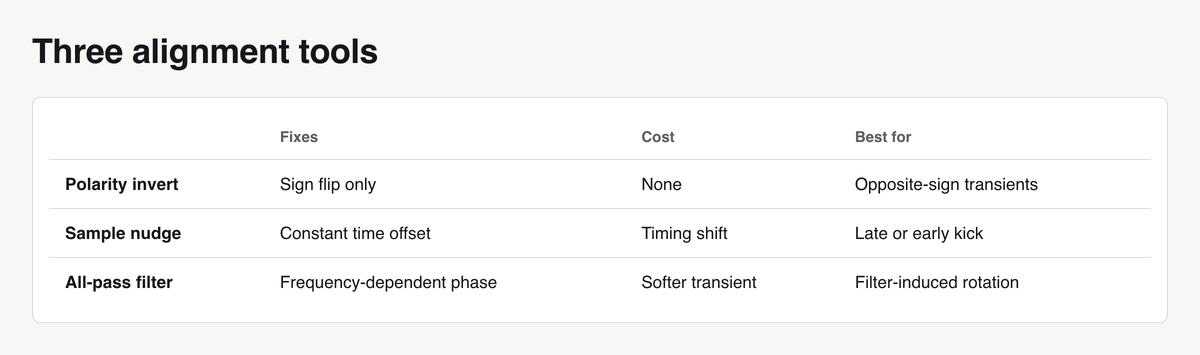
Polarity inversion flips the whole signal around zero: every positive sample becomes negative. It is frequency-independent and instantaneous. This is the “ø” button. It only helps when two signals are near-identical in shape but opposite in sign — the classic top/bottom snare mic case.
Time offset is a constant delay, measured in samples. A kick that starts 3 ms later than the bass note is not polarity-inverted; it is late. At 50 Hz, one full cycle is 20 ms, so 3 ms is roughly 54° of rotation at that frequency — and a different number of degrees at every other frequency. You fix this by moving audio, not by flipping it.
Frequency-dependent phase rotation is what filters and nonlinear processing do. A minimum-phase high-pass shifts low frequencies in time more than high ones. Saturation changes phase depending on level. Here, no single delay value fixes anything, because the error is different at 40 Hz than at 90 Hz.
This is why the polarity button usually disappoints. It offers one of two states when the actual error lives on a continuous axis.
Where Kick and Bass Phase Actually Breaks
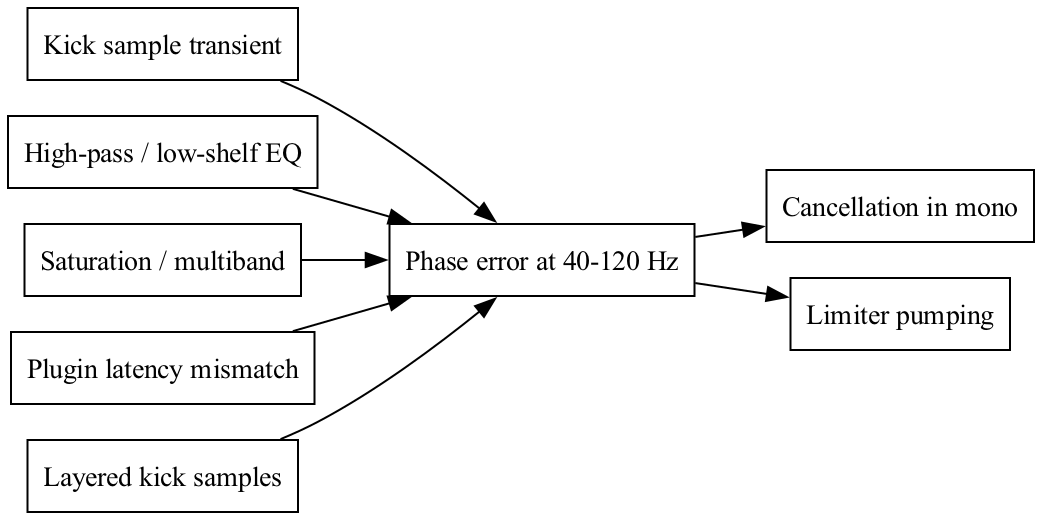
The kick sample itself. Many commercial kicks start with a negative half-cycle, or carry a DC offset from how they were rendered. If your bass starts positive, the first and loudest part of both signals works against itself. Symptom: the kick loses weight only when the bass plays, never when it’s solo.
High-pass and low-shelf EQ. Every minimum-phase filter adds group delay near its corner. A 30 Hz high-pass on the bass rotates phase well up into the 60-80 Hz region. Symptom: the mix got worse right after you “cleaned up” the sub.
Saturation and multiband plugins. Multiband splitters use crossover filters, and crossovers rotate phase around the split point. Symptom: low end moves when you change drive or threshold, not just when you change EQ.
Latency mismatch between chains. If the kick bus runs a linear-phase EQ and the bass bus doesn’t, delay compensation handles the overall offset but the filter’s internal pre-ringing still changes the relationship. Symptom: alignment that was fine yesterday is off today after you added one plugin.
Layered kicks. Two kick samples stacked, each with its own transient direction, cancel each other before the bass even enters. Symptom: the layered kick is quieter than the louder of the two layers alone.
Diagnose Before You Fix: The Listening Protocol
Run these in order and let the result point at the cause.
- Solo kick and bass only, then collapse to mono. If the low end survives in stereo and vanishes in mono, you have phase cancellation, not an EQ problem.
- Watch the correlation meter. With only kick and bass playing, correlation should sit close to +1 in the low band. Values hovering near zero or dipping negative on every kick hit mean the two are fighting. Aligned material pushes the needle toward +1 and keeps it steadier across the bar instead of jumping per note.
- Bypass the bass and compare peak and short-term LUFS. If removing a whole bass part changes the number very little, the bass was cancelling the kick rather than adding to it.
- Sweep a narrow band through 40-120 Hz. Find where the summed signal is weakest. A notch around the kick fundamental points at the kick/bass relationship; a notch higher up usually points at a filter or crossover.
Manual Alignment: Zoom In and Nudge the Waveform
Start with the waveform, not a plugin. Zoom in to sample level on the kick’s attack and read the direction of the first half-cycle: does it go up or down from zero? Do the same on the bass note that lands on the downbeat. If one starts positive and the other negative, you have found the first half of your problem.
In Logic Pro:
- Zoom until individual samples are visible (the waveform display switches to a continuous line).
- Trim leading silence off the kick region so the transient sits exactly on the grid. Silence in front of a sample is a hidden time offset.
- Set Nudge Value to “1 Sample” and move the bass or kick region while listening in mono. Small moves, single samples at a time, until the low end gets loud.
- To flip polarity, insert the Gain plugin on the channel and enable Phase Invert (left and right both). Gain is cheap and introduces no latency.
Nudge the element that has the least rhythmic consequence. Moving a sustained bass line a few samples is inaudible as timing; moving a kick that defines the groove is riskier.
Rotating Phase With an All-Pass Filter
When no amount of nudging gives you a clean sum, the error is frequency-dependent and a constant delay can’t fix it. An all-pass filter changes phase without changing magnitude — same frequency response, different timing per frequency.
Set the all-pass centre frequency at the kick’s fundamental, typically somewhere between 45 and 60 Hz, and sweep the phase control continuously while watching the summed output level in mono. The setting that gives maximum summed amplitude is the right one. That is the whole method: you are hunting for the loudest, not the prettiest.
The cost is real. Rotating phase around the fundamental smears the kick’s transient — the attack softens, the click loses bite. If that trade hurts more than the cancellation did, go back to nudging and accept a compromise.
Automatic Phase Alignment Plugins: What They Do and Where They Fail
Auto-alignment tools pick a reference signal, cross-correlate it against your target to estimate the time offset, then apply a delay plus an all-pass rotation to maximise the correlation. On static, repeating material that works well.
Three things break it. Changing bass notes: the optimal rotation at a root of 50 Hz is not optimal at 65 Hz, and the plugin computes one answer for the whole part. Layered kicks: if the reference itself is internally cancelling, the tool optimises against a compromised target. Program-dependent saturation: when phase changes with level, no fixed correction is correct across the dynamic range.
Use these tools as coarse alignment. Let them land you in the neighbourhood, then verify by ear in mono and finish with manual nudge. Never bounce a track trusting the meter alone.
Get Phase Right and You Need Less Sidechain
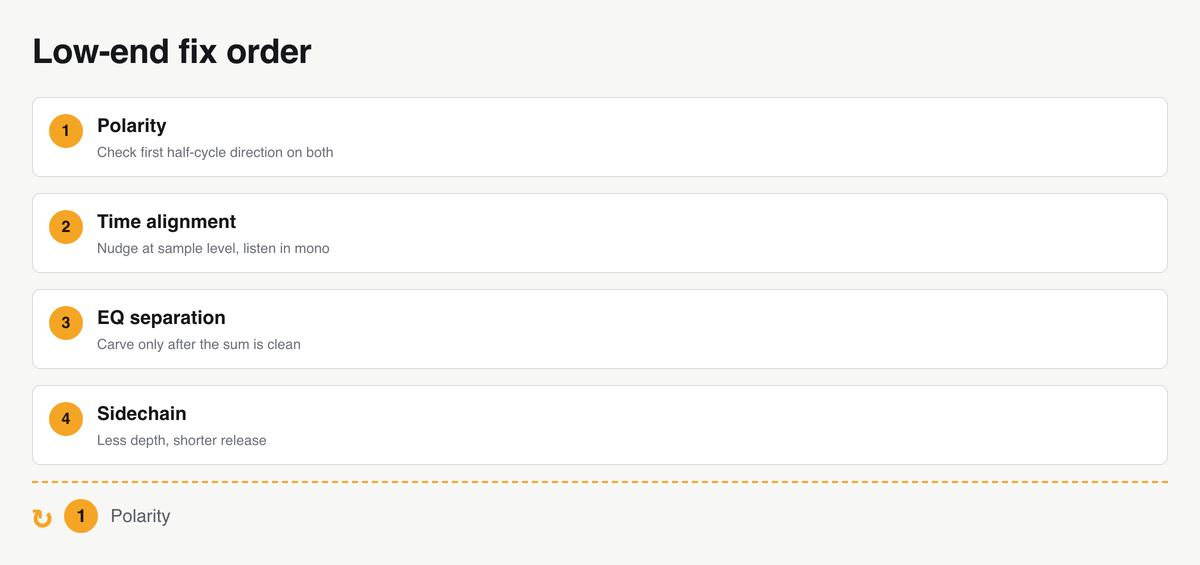
Most sidechain compression in dance music is doing two jobs: creating the pumping effect people want, and hiding a phase problem people never diagnosed. Heavy ducking works because it removes the bass during the exact window where it was cancelling the kick. That’s a workaround, not a fix.
Align the phase first and the required ducking depth drops. Release times get shorter because you no longer need the bass out of the way for the kick’s whole decay. The groove breathes instead of gasping, and the bass stays audible through the downbeat.
Order matters:
Baking the Fix Into Your Template
Alignment you do once should never be done twice. Save the aligned kick/bass sample pair into your template as a committed pair — not two separate favourites you’ll recombine later.
Also fix the structural conditions: keep plugin chains on the kick and bass buses symmetrical so latency compensation behaves identically, place a Gain plugin with phase invert ready (but bypassed) on the kick bus so flipping takes one click, and keep a correlation meter on the master or a dedicated low-end bus so you see the problem the moment it appears. If you don’t have a template yet, build one first — alignment is one of the things it exists to protect.
What to Do Next
Open your current project and do these three things today:
- Solo kick and bass, fold to mono, and write down what the correlation meter reads on the downbeat. That number is your baseline.
- Zoom to sample level on both and check whether the first half-cycles point in the same direction. Flip polarity if they don’t, then nudge in single samples until the mono sum is loudest.
- Save the aligned pair into your template so the next track starts from a clean low end instead of a limiter fight.