

Eyeballing the UI Is Not a Test Strategy
Functional tests assert behavior: the button exists, the click fires, the API returns 200. None of that notices that the button is now 4px off the grid, renders in Arial because the webfont failed, or that its label is clipped to “Subscri…” at 1280px. The DOM is correct. The pixels are not.
That is the exact bug class visual regression testing owns: CSS cascade shifts after a refactor, wrong or missing fonts, broken layout at a given viewport, truncated or overflowing text, and elements that collapse when a container’s flex rules change. It does not own accessibility, interaction logic, or data correctness — don’t let a screenshot stand in for an assertion you could write directly. And manual review doesn’t scale here: a human comparing two pages side by side reliably misses a 3px shift, and after the fifth PR of the day they stop looking at all. A pixel comparator never gets bored, which is both its value and its failure mode — it also reports on things you never cared about. That tension is the whole subject of this post. (Related reading: can UI testing be automated at all.)
What toHaveScreenshot Does on the First Run
toHaveScreenshot() compares the current rendering against a stored baseline PNG. On the first run that file doesn’t exist, so Playwright writes it and fails the test with “A snapshot doesn’t exist at …, writing actual.” This is intentional: a test that silently passes while creating its own source of truth is not a test. Re-run it and it passes against the file it just wrote.
The file lands next to the spec, in a directory named after it, with platform and project suffixes:
tests/
  checkout.spec.ts
  checkout.spec.ts-snapshots/
    summary-card-chromium-darwin.png
    summary-card-chromium-linux.png
That -linux / -darwin suffix is not decoration — it is Playwright telling you that a baseline is only valid on the OS that produced it. Hold that thought for the platform section.
// tests/checkout.spec.ts
import { test, expect } from '@playwright/test';

test('order summary card matches baseline', async ({ page }) => {
  await page.goto('/checkout');
  await expect(page.getByTestId('order-summary')).toHaveScreenshot('summary-card.png');
});
# First run: baseline is written, test fails.
npx playwright test tests/checkout.spec.ts

# Deliberately regenerate baselines after an intended UI change:
npx playwright test tests/checkout.spec.ts --update-snapshots
Run --update-snapshots only when you have decided the new rendering is correct. It is a “yes, I approve this design change” command, not a “make the red go away” command.
The Five Sources of Instability
Visual tests go flaky for five concrete reasons, and each has a mechanical cause:
- Animations and transitions. The screenshot is taken at an arbitrary point on a timeline. A 200ms fade-in sampled at t=140ms and t=160ms produces different alpha values on every pixel of the element.
- Font loading race. The browser paints with a fallback font, then re-paints when the webfont arrives. Capture between those two paints and you compare Arial against Inter — thousands of differing pixels.
- Dynamic content. Timestamps, relative dates (“2 minutes ago”), random avatars, rotating banners, user-generated text. The content legitimately changes between runs; the comparator cannot know that.
- Lazy-loaded images. An
IntersectionObserverfires when the element scrolls into view. Screenshot timing and scroll position decide whether you capture the image or its placeholder. - Scrollbar and viewport differences. An overlay scrollbar on macOS occupies 0px; a classic scrollbar on Linux occupies ~15px and shifts the entire layout horizontally. Different viewport or
deviceScaleFactorsettings between local and CI produce entirely different images.
The first four are fixable in test code. The fifth is mostly an environment problem. If instability in your suite goes beyond visual tests, the general diagnosis method applies: find the root cause instead of adding retries.
Making Animations and Font Loading Deterministic
Set these globally, not per test. A per-test option you forget to copy is the next flaky test.
// playwright.config.ts
import { defineConfig, devices } from '@playwright/test';

export default defineConfig({
  testDir: './tests',
  expect: {
    toHaveScreenshot: {
      animations: 'disabled',
      caret: 'hide',
      scale: 'css',
      maxDiffPixelRatio: 0.002,
    },
  },
  use: {
    baseURL: 'http://localhost:3000',
    viewport: { width: 1280, height: 720 },
    deviceScaleFactor: 1,
  },
  projects: [{ name: 'chromium', use: { ...devices['Desktop Chrome'] } }],
});
What each line buys you:
animations: 'disabled'finishes CSS animations and transitions and freezes them at their end state before capture. Skip it and every fade, slide or skeleton shimmer becomes a random diff.caret: 'hide'removes the blinking text cursor. Skip it on a page with a focused input and roughly half your runs fail on a 1×16px black bar.scale: 'css'captures at CSS pixel size regardless of the device scale factor, so a Retina machine and a CI container produce comparably sized images.- A fixed
viewportanddeviceScaleFactorremove the most common cause of “the whole image is shifted”.
Fonts need an explicit wait, because load fires before webfonts are necessarily applied:
// tests/fixtures.ts
import { test as base, expect } from '@playwright/test';

export const test = base.extend<{ visualPage: import('@playwright/test').Page }>({
  visualPage: async ({ page }, use) => {
    await page.addInitScript(() => {
      // Deterministic image placeholders for lazy-loaded media.
      document.documentElement.classList.add('vrt');
    });
    await use(page);
  },
});

export async function settle(page: import('@playwright/test').Page) {
  await page.evaluate(() => document.fonts.ready);
  await page.evaluate(() => window.scrollTo(0, 0));
  await page.waitForLoadState('networkidle');
}

export { expect };
// tests/pricing.spec.ts
import { test, expect, settle } from './fixtures';

test('pricing table renders with the brand font', async ({ page }) => {
  await page.goto('/pricing');
  await settle(page);
  await expect(page.getByRole('table', { name: 'Plans' })).toHaveScreenshot('pricing-table.png');
});
document.fonts.ready resolves when all pending font loads settle. If your webfont is only requested after first paint, preload it in the test environment (<link rel="preload" as="font" crossorigin>) — otherwise fonts.ready can resolve before the font was even requested, and you are back to a race.
Masking: Keeping Dynamic Content Out of the Comparison
mask paints the matched locators with a solid color before comparison, so their contents never reach the diff:
import { test, expect, settle } from './fixtures';

test('dashboard header ignores volatile widgets', async ({ page }) => {
  await page.goto('/dashboard');
  await settle(page);

  await expect(page.getByTestId('dashboard-header')).toHaveScreenshot('dashboard-header.png', {
    mask: [page.getByTestId('user-avatar'), page.getByTestId('last-login')],
    maskColor: '#FF00FF',
  });
});
Use a loud maskColor like magenta: when you review a diff image, you want masked regions to be obvious, not to blend into the design.
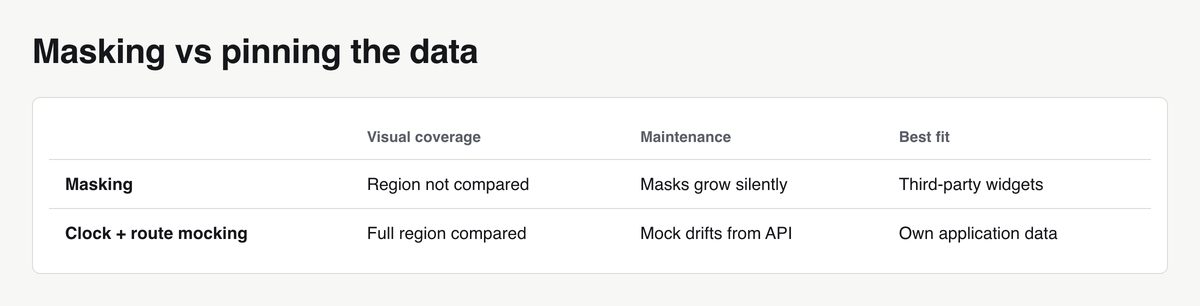
The cost is direct — a masked region is no longer tested. Mask the avatar and you stop detecting that the avatar became a 400px square. Masks grow silently; a header with six masks is a header with no visual coverage left.
Prefer pinning the data over hiding it. Fixed clock plus mocked responses give you a deterministic and fully compared rendering:
import { test, expect, settle } from './fixtures';

test('dashboard header with pinned data', async ({ page }) => {
  await page.clock.setFixedTime(new Date('2025-03-01T09:00:00Z'));
  await page.route('**/api/me', async (route) => {
    await route.fulfill({
      status: 200,
      contentType: 'application/json',
      body: JSON.stringify({
        name: 'Ada Lovelace',
        avatarUrl: '/static/test/avatar.png',
        lastLogin: '2025-02-28T18:30:00Z',
      }),
    });
  });

  await page.goto('/dashboard');
  await settle(page);
  await expect(page.getByTestId('dashboard-header')).toHaveScreenshot('dashboard-header.png');
});
Reach for masking when the content is genuinely outside your control — a third-party ad slot, an embedded map tile, a video frame. Everything else belongs in owned, deterministic test data.
Tuning Thresholds With Real Numbers
Three options, two different units, and people confuse them constantly:
threshold(default0.2, range 0–1) is a per-pixel color distance in YIQ space. It decides whether a single pixel counts as different at all. Antialiasing noise lives here.maxDiffPixelsis an absolute count of pixels allowed to differ.maxDiffPixelRatiois that count as a fraction of total pixels, which scales with the element’s size.
A sane starting point is the default threshold plus a small maxDiffPixelRatio, tightened per test where the component is large:
await expect(page.getByTestId('plan-card')).toHaveScreenshot('plan-card.png', {
  threshold: 0.2,
  maxDiffPixelRatio: 0.002,
});

// Large surface, same tolerance expressed as an absolute budget:
await expect(page.getByTestId('report-canvas')).toHaveScreenshot('report-canvas.png', {
  maxDiffPixels: 150,
});
The trap: a failing test gets “fixed” by raising maxDiffPixelRatio to 0.05. On a 1280×720 capture that is roughly 46,000 pixels of permitted change — enough to move a button across the screen and still pass. You now run a test that cannot fail, which is worse than no test, because it buys false confidence and still costs CI time.
Raising tolerance is an answer to one question only: “is this residual noise from subpixel antialiasing?” Every other failure means something moved, and the fix belongs in the source: freeze the animation, pin the clock, fix the viewport, mock the request. Tolerance is not a dial you tune until green.
Full Page or Component: Choosing the Comparison Scope
A full-page snapshot couples one baseline to every component on the page. Change the footer copyright year and 14 page-level baselines go red. The diff tells you the page differs; it does not tell you which change was intended. Maintenance cost grows with the number of components per page times the number of pages that embed them.
Component-scoped snapshots fail where the change happened and survive unrelated edits:
import { test, expect, settle } from './fixtures';

const components = ['primary-button', 'alert-banner', 'data-table', 'pagination'];

test.describe('design system', () => {
  for (const name of components) {
    test(`${name} matches baseline`, async ({ page }) => {
      await page.goto(`/storybook-preview?component=${name}`);
      await settle(page);
      await expect(page.getByTestId(name)).toHaveScreenshot(`${name}.png`);
    });
  }
});

test('marketing landing page, full layout', async ({ page }) => {
  await page.goto('/');
  await settle(page);
  await expect(page).toHaveScreenshot('landing.png', {
    fullPage: true,
    mask: [page.getByTestId('trust-logos-carousel')],
  });
});
Full-page still earns its place where the arrangement itself is the product: marketing landing pages, email or print layouts, PDF-like report views. There, a shifted section is the bug.
Platform Drift: Why a Local Pass Fails in CI
macOS and Linux rasterize fonts differently. CoreText and FreeType apply different hinting, stem darkening and subpixel antialiasing rules, so identical text at an identical size produces different gray values along every glyph edge. Add GPU-accelerated compositing on one machine and software rendering on the other, and gradients, shadows and border radii differ too.
This is why a baseline generated on a laptop typically fails in a Linux container even though nothing in the UI changed — and why the diff looks like a faint outline around all the text rather than a layout shift. Recognize that signature: edge-only noise across glyphs means platform drift, not a regression.
The fix is not a higher threshold. Generate and verify baselines in exactly one environment — the official Playwright image — and run that same image locally.

# Generate or update baselines in the same Linux runtime CI uses.
# Keep the image tag in sync with your installed Playwright version.
docker run --rm -it \
  -v "$(pwd)":/work -w /work \
  --ipc=host \
  mcr.microsoft.com/playwright:v1.50.0-noble \
  npx playwright test --update-snapshots
{
  "scripts": {
    "test:visual": "docker run --rm -v \"$PWD\":/work -w /work --ipc=host mcr.microsoft.com/playwright:v1.50.0-noble npx playwright test --grep @visual",
    "test:visual:update": "docker run --rm -v \"$PWD\":/work -w /work --ipc=host mcr.microsoft.com/playwright:v1.50.0-noble npx playwright test --grep @visual --update-snapshots"
  }
}
Two rules follow: never commit a -darwin baseline for a suite that runs on Linux, and pin the image tag. A Playwright minor upgrade ships a new Chromium build, and new Chromium builds change rendering.
Baseline Management and Review Flow in CI
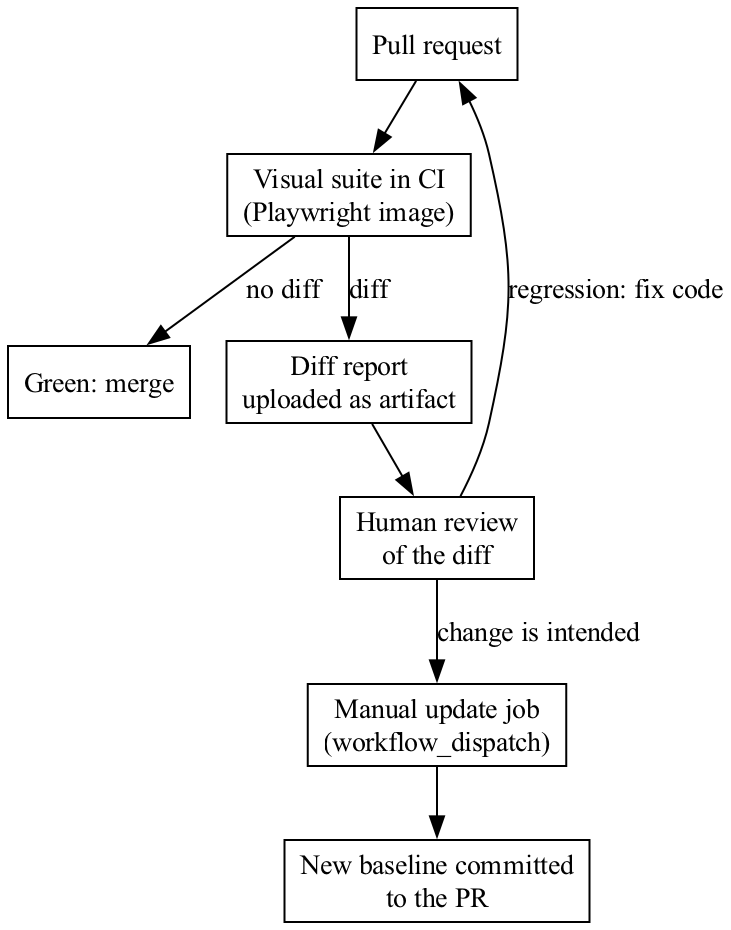
Baselines belong in the repository, under version control, reviewed in the pull request that changes them. A design change then produces a reviewable artifact: the diff of a PNG in a PR. Storing baselines as CI artifacts instead makes them invisible to review and unreachable from a developer’s machine.
The second rule: never regenerate baselines automatically on failure. A job that runs --update-snapshots when the suite is red converts every regression into a committed baseline. The test stays green forever and detects nothing.
# .github/workflows/visual.yml
name: visual-regression

on:
  pull_request:
  workflow_dispatch:
    inputs:
      update_baselines:
        description: 'Regenerate baselines (requires review approval)'
        type: boolean
        default: false

jobs:
  visual:
    runs-on: ubuntu-latest
    container:
      image: mcr.microsoft.com/playwright:v1.50.0-noble
      options: --ipc=host
    steps:
      - uses: actions/checkout@v4
      - run: npm ci
      - name: Run visual tests
        run: npx playwright test --grep @visual
      - name: Upload diff report
        if: always()
        uses: actions/upload-artifact@v4
        with:
          name: visual-diff-report
          path: |
            playwright-report/
            test-results/
          retention-days: 7

  update-baselines:
    if: github.event_name == 'workflow_dispatch' && inputs.update_baselines
    environment: visual-baselines   # requires a reviewer to approve
    runs-on: ubuntu-latest
    container:
      image: mcr.microsoft.com/playwright:v1.50.0-noble
      options: --ipc=host
    steps:
      - uses: actions/checkout@v4
        with:
          ref: ${{ github.head_ref || github.ref_name }}
      - run: npm ci
      - run: npx playwright test --grep @visual --update-snapshots || true
      - name: Commit updated baselines
        run: |
          git config user.name "ci-bot"
          git config user.email "ci****@*****le.com"
          git add '**/*-snapshots/**'
          git commit -m "chore: update visual baselines" || echo "nothing to update"
          git push
The environment: visual-baselines gate is the important line: a protected environment with required reviewers means no baseline changes without a human saying yes.
The Maintenance Cost and Where to Stop
Every baseline is a file someone must re-approve whenever the design changes intentionally. Snapshot 300 components and a single brand color change turns into 300 review items — at which point the team starts approving in bulk, and bulk approval is how a real regression gets merged.
Snapshot a surface when:
- It is a design system component rendered in isolation. Small image, stable, high reuse, and a diff pinpoints the cause immediately.
- It is a critical conversion or financial screen — checkout, pricing, invoice, report — where a layout break costs money directly.
- The layout itself is the deliverable: landing pages, print and email templates.
Skip it when:
- The screen is dominated by user-generated or third-party content; you would mask away most of the comparison anyway.
- The feature is under active redesign; baselines churn faster than they catch anything.
- The assertion can be written directly — “the error text is red” is a CSS assertion, not a screenshot.
A practical cap: if a single intended design change forces you to regenerate more than a handful of baselines, your scope is too wide or too full-page.
What to Do Next
Introduce visual regression as a narrow, well-instrumented slice rather than a suite-wide switch. A realistic first week:
- Day 1–2: Pick one screen — the highest-value conversion page you own. Add
animations: 'disabled',caret: 'hide',scale: 'css', and a fixed viewport toplaywright.config.ts. Write thesettle()helper withdocument.fonts.ready. - Day 2–3: Set up the Docker baseline workflow. Add the
test:visualandtest:visual:updatescripts, generate baselines inside the image, commit them with the-linuxsuffix. - Day 3–4: Pin the dynamic data with
page.clock.setFixedTimeandpage.route. Mask only what is genuinely third-party. Run the suite ten times in a row in the container; anything that fails intermittently is a determinism bug, not a tolerance problem — fix it before moving on. - Day 5: Wire the CI job, upload the diff report as an artifact, and put the baseline-update job behind a protected environment.
Expect the first days to produce failures concentrated in exactly the five causes listed above — that is normal and it is the point of starting with one screen. After two sprints of a stable, unmodified baseline on that screen, expand to your design system components, one directory at a time. If you are still deciding on tooling before any of this, start with a comparison on real criteria.