

The Problem: Why Visual Regression Needs Constant Maintenance
Pixel-based visual regression starts as the cheapest safety net you can buy and turns into the most expensive one you maintain. Three failure modes show up in almost every project that runs it long enough.
Baseline sprawl. Every viewport, every theme, every locale multiplies the image count. A suite with 40 pages, three breakpoints and a dark mode is already at 240 images — before you add a second browser engine.
False positives from rendering. Anti-aliasing, font hinting, GPU compositing and scrollbar width differ between your laptop and the CI container. You can pin a browser version and run everything in Docker, and you will still get sub-pixel noise on text-heavy pages. So you raise the diff threshold, and now the threshold is high enough to swallow real defects.
Bulk approval after intentional changes. A designer changes the button radius. 180 baselines go red. Nobody reviews 180 images; somebody clicks “approve all.” And this is where the suite quietly stops being a test: the pipeline is red, but no one is reading the failure anymore — they are clearing it. The next real regression ships inside that same bulk approval, because it was in image 94 and image 94 looked fine at thumbnail size.
That pattern is not a discipline problem. It’s a design consequence of what pixel comparison measures.
What Pixel Comparison Actually Verifies
A pixel diff is an equality check, not a judgment. It answers one question: is this screen different from the stored image? It does not answer: is this screen correct?
Those are two separate jobs, and conflating them is the root of the maintenance load. Difference detection has no concept of intent. It cannot tell you that the price label is now overlapping the shipping estimate, because it does not know what a price label is. It can only tell you that 1,400 pixels changed in a region, and leave the interpretation to a human.
Acceptance-criteria verification is the other job: checking a screen against a stated expectation. “The error message is visible.” “No text is truncated.” “The form labels are aligned with their inputs.” Traditional automation handles a slice of this through the DOM — you can assert that an element is visible, that it contains certain text, that it has a CSS class. But the DOM tells you an element exists; it does not tell you that it’s rendered behind a modal overlay, or that its text is clipped by a fixed-height container, or that the contrast against its background is unreadable.
So there is a gap: pixel diff detects change without judgment, DOM assertions make judgments without seeing. The screenshot-analyzing agent sits in that gap.
What a Screenshot-Analyzing Agent Actually Does
A multimodal model takes the screenshot plus an expectation written in natural language, and returns a reasoned verdict. No baseline image is stored. Instead of “does this match yesterday?”, you ask “does this satisfy these criteria?”
Typical criteria look like this:
- No visible text is cut off or clipped by its container.
- All form fields are left-aligned with their labels.
- The validation error is visible and positioned next to the field it refers to.
- No two interactive elements overlap.
- All visible copy is in English.
The output is not a boolean. It’s an assessment with evidence: which criterion failed, where on the screen, and why. That’s what makes it useful for triage rather than just another red light.
The trade changes shape. Pixel regression’s maintenance cost is in baselines; agent-based verification’s maintenance cost is in criteria. Criteria are text, they live in your repo, they’re reviewable in a pull request, and a design change often doesn’t invalidate them at all. A change in button radius breaks 180 baselines. It breaks zero criteria.
A Verification Flow Built With Microsoft Agent Framework
Playwright captures the screenshot; the agent evaluates it against criteria and returns schema-bound JSON. Structured output is not optional here — if the agent returns prose, you cannot write an assertion against it.
# visual_agent.py
import asyncio
from pydantic import BaseModel, Field
from playwright.async_api import async_playwright
from agent_framework import ChatMessage, DataContent, Role, TextContent
from agent_framework.openai import OpenAIChatClient

REVIEWER_INSTRUCTIONS = """
You are a UI verification reviewer. You receive one screenshot and a list of
criteria. Evaluate ONLY what is visible in the image.

Rules:
- Judge each criterion independently.
- A criterion fails only if the image shows clear evidence of failure.
- If the image does not contain enough information, mark the criterion as
  passed=true and state the uncertainty in `evidence`.
- Never speculate about behaviour that is not visible (hover, animation, scroll).
- `evidence` must describe a concrete region of the screen, e.g.
  "the second input in the billing card, label overlaps the field border".
"""


class Finding(BaseModel):
    criterion: str = Field(description="The criterion text, copied verbatim.")
    passed: bool
    severity: str = Field(description="One of: none, minor, major.")
    evidence: str


class ScreenReview(BaseModel):
    passed: bool = Field(description="False if any finding has passed=false.")
    findings: list[Finding]
    summary: str


def build_reviewer():
    client = OpenAIChatClient(model_id="gpt-4.1-mini")
    return client.create_agent(
        name="ui-reviewer",
        instructions=REVIEWER_INSTRUCTIONS,
        temperature=0,
    )


async def review_screenshot(agent, png_bytes: bytes, criteria: list[str]) -> ScreenReview:
    criteria_block = "\n".join(f"- {c}" for c in criteria)
    message = ChatMessage(
        role=Role.USER,
        contents=[
            TextContent(text=f"Evaluate the screenshot against these criteria:\n{criteria_block}"),
            DataContent(data=png_bytes, media_type="image/png"),
        ],
    )
    response = await agent.run(message, response_format=ScreenReview)
    return response.value


async def main():
    criteria = [
        "No visible text is truncated or clipped by its container.",
        "Every form label is horizontally aligned with its input field.",
        "No two interactive elements visually overlap.",
        "All visible copy is in English.",
    ]

    agent = build_reviewer()
    async with async_playwright() as p:
        browser = await p.chromium.launch()
        page = await browser.new_page(viewport={"width": 1280, "height": 900})
        await page.goto("https://demo.playwright.dev/todomvc/")
        await page.get_by_placeholder("What needs to be done?").fill("Write the criteria")
        await page.keyboard.press("Enter")
        png = await page.screenshot(full_page=False, animations="disabled")
        await browser.close()

    review = await review_screenshot(agent, png, criteria)
    print(review.summary)
    for f in review.findings:
        if not f.passed:
            print(f"[{f.severity}] {f.criterion} -> {f.evidence}")
    assert review.passed, review.summary


if __name__ == "__main__":
    asyncio.run(main())
Two details carry most of the weight. animations="disabled" removes a large class of input variance before the model ever sees the image. And the instruction “if the image does not contain enough information, mark as passed” biases the agent toward silence instead of invented failures — an agent that guesses is worse than no agent.
Flow Architecture: Where It’s Deterministic, Where It’s Probabilistic
Only one layer in this pipeline is probabilistic. Navigation, interaction, screenshot capture, schema validation and reporting all stay deterministic. Drawing that boundary explicitly is what keeps the setup debuggable: when a run behaves oddly, you know there’s exactly one box that can produce a different answer for the same input.
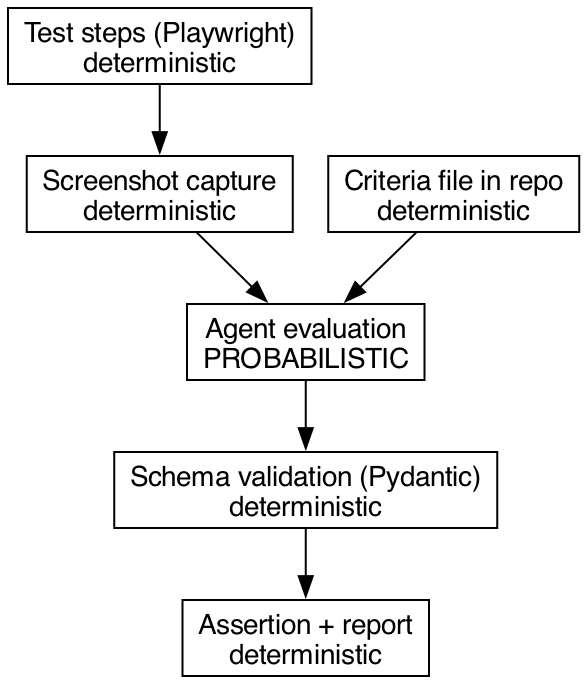
If the schema validation step fails, that is a hard error, not a retry-and-hope situation. A model that cannot produce valid JSON against a four-field schema will not produce a reliable verdict either.
Stability: Same Screenshot, Two Different Answers
The real risk of agent-based verification is a new shape of flakiness. An assertion that returns different results for identical input is the textbook definition of a flaky test — and the usual root-cause hunt doesn’t apply, because the cause is sampling, not timing. (If you want the deterministic version of that discussion, I’ve written about diagnosing flaky tests in Playwright, in Turkish.)
The mitigations, in the order worth applying:
- Temperature at zero. Reduces variance; does not eliminate it. Non-determinism at the inference layer survives temperature 0.
- Narrow the criteria. “Does this screen look good?” produces different answers every run, because the question has no decision boundary. “Is any text clipped by its container?” produces stable answers, because it does. Vague criteria are the single largest source of agent flakiness; this is typically where instability disappears once you fix it.
- Majority vote over N runs. Run the evaluation three times, take the majority verdict. Triples the cost, converts occasional disagreement into a stable answer, and gives you a disagreement rate you can log.
- Cache by screenshot hash. Same image + same criteria version = reuse the stored verdict. Saves both money and variance for screens that didn’t change.
None of these makes the layer deterministic. They make it measurably stable, which is a different and achievable goal. Track the disagreement rate as a first-class metric: if the same screenshot yields different verdicts more than rarely, your criteria are the problem, not the model.
Cost and Latency: Analyzing 400 Screenshots on Every PR
A pixel diff runs in milliseconds with zero marginal cost. A model call takes seconds and bills per token, and an image is a lot of tokens. Across a 400-screenshot suite, that’s the difference between a step you don’t notice and a step that dominates your pipeline duration and shows up on the finance report. Measure it in your own pipeline before you scale it — latency per call and cost per call are the two numbers that decide the design, and they depend on your model, image resolution and detail setting.
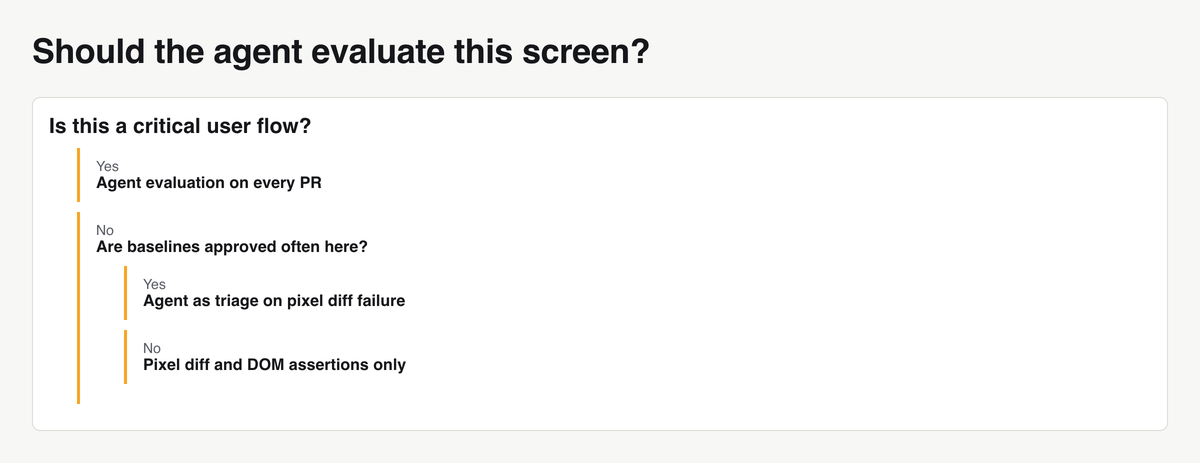
Which means: the agent does not run on every screen. It runs on a selected set. A concrete rule set for selection:
- Critical user flows. Checkout, signup, payment, password reset. Screens where a visual defect has direct revenue or support cost.
- High design-churn pages. Pages whose baselines get approved most often. High churn means baselines are worthless there anyway — that’s exactly where criteria-based verification earns its keep.
- Accessibility-sensitive components. Contrast, focus indicators, truncated labels on controls. Things a DOM assertion passes and a human notices immediately.
Everything else stays on pixel diff or DOM assertions. If you want the broader argument for budgeting pipeline time deliberately, see performance optimization in test automation (Turkish).
Which One for Which Job: A Comparison
Pixel comparison detects any change, costs nothing per run, fits CI perfectly, and carries its maintenance burden in baselines, with false positives driven by rendering noise. DOM and CSS assertions detect only what you explicitly named, cost nothing, carry their burden in selectors, and produce false positives when markup is refactored without a visual change. Agent evaluation detects user-visible defects it was asked about, costs per call, carries its burden in criteria, and produces false positives through model variance — which also makes it the only one of the three that does not fit “run on everything in CI.”
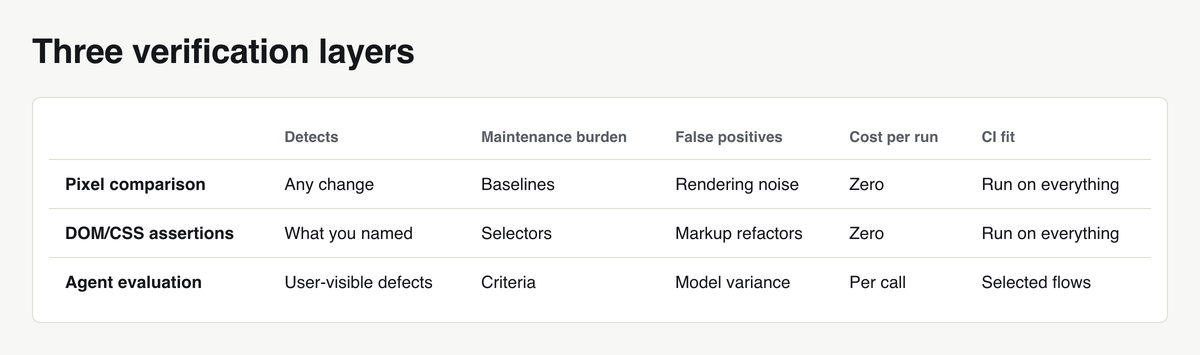
The agent does not replace pixel comparison. It fills the gap between “something changed” and “something is wrong.”
What the Agent Misses and What It Catches
Catches reliably: truncated text, overlapping elements, empty-state screens that should have content, untranslated or wrong-language copy, unreadable contrast, images that failed to load, layout collapse at a given viewport, a modal rendered behind its overlay.
Misses reliably: a 2-pixel shift, a brand color off by one shade, a font weight changing from 500 to 600, a 1-pixel border becoming 2, spacing drift of a few pixels across a grid. These are exactly what pixel diff is good at and what no natural-language criterion can express.
Knowing both lists is what determines placement. If your design system has strict token compliance, you need pixel comparison or token-level CSS assertions — the agent will not help. If your recurring production bugs are “the label was cut off in German,” the agent catches that class of defect without a single baseline image. This is also where the long-standing question of whether UI and usability testing can be automated at all (Turkish) gets a partial, concrete answer.
A Tiered Strategy: Running Both Together
The highest-value arrangement is not “agent instead of pixel diff.” It’s agent as the triage layer after pixel diff. Cheap and deterministic first: DOM assertions. Then pixel comparison. Only when the diff goes red do you ask the model one narrow question: is this difference meaningful to a user?
This ordering attacks the “approve all” reflex directly. Instead of a human scanning 180 thumbnails, the agent produces a reasoned verdict for each one, and the human reviews the subset the agent flagged as user-visible.
# test_checkout.py
import pytest
from playwright.async_api import Page, expect
from pydantic import BaseModel
from agent_framework import ChatMessage, DataContent, Role, TextContent
from agent_framework.openai import OpenAIChatClient

TRIAGE_INSTRUCTIONS = """
You compare two screenshots of the same page: BASELINE (before) and CURRENT (after).
Decide whether the difference is meaningful to an end user.

Meaningful: truncated text, overlapping elements, missing content, broken layout,
unreadable contrast, wrong language, images that failed to load.
Not meaningful: anti-aliasing, sub-pixel text shifts, scrollbar width,
cursor position, differences under roughly 3 pixels of offset.

If the two images look equivalent to a user, set user_visible=false.
"""


class TriageVerdict(BaseModel):
    user_visible: bool
    reason: str


@pytest.fixture(scope="session")
def triage_agent():
    client = OpenAIChatClient(model_id="gpt-4.1-mini")
    return client.create_agent(
        name="diff-triage",
        instructions=TRIAGE_INSTRUCTIONS,
        temperature=0,
    )


async def triage(agent, baseline_png: bytes, current_png: bytes) -> TriageVerdict:
    message = ChatMessage(
        role=Role.USER,
        contents=[
            TextContent(text="BASELINE:"),
            DataContent(data=baseline_png, media_type="image/png"),
            TextContent(text="CURRENT:"),
            DataContent(data=current_png, media_type="image/png"),
            TextContent(text="Is this difference meaningful to an end user?"),
        ],
    )
    response = await agent.run(message, response_format=TriageVerdict)
    return response.value


@pytest.mark.asyncio
async def test_checkout_summary(page: Page, triage_agent, tmp_path):
    await page.goto("https://example.test/checkout")

    # Tier 1 - deterministic DOM assertions, zero cost.
    await expect(page.get_by_test_id("order-total")).to_have_text("128.40 EUR")
    await expect(page.get_by_role("button", name="Pay now")).to_be_enabled()

    # Tier 2 - pixel comparison, zero marginal cost.
    baseline_path = "snapshots/checkout-summary.png"
    try:
        await expect(page).to_have_screenshot(
            "checkout-summary.png",
            max_diff_pixel_ratio=0.001,
            animations="disabled",
        )
        return
    except AssertionError as pixel_failure:
        # Tier 3 - agent triage, only on failure.
        with open(baseline_path, "rb") as f:
            baseline_png = f.read()
        current_png = await page.screenshot(animations="disabled")

        verdict = await triage(triage_agent, baseline_png, current_png)
        if verdict.user_visible:
            raise AssertionError(
                f"Visual change is user-visible: {verdict.reason}"
            ) from pixel_failure

        (tmp_path / "triage.txt").write_text(
            f"Suppressed pixel diff on checkout-summary: {verdict.reason}"
        )
        pytest.skip(f"Pixel diff judged cosmetic by triage: {verdict.reason}")
Two deliberate choices. The agent runs only on the failure path, so the cost is proportional to the number of red baselines, not the suite size. And a “not meaningful” verdict produces a skip, not a silent pass — the test is recorded as unverified, so suppressed diffs remain countable. If that number grows, your thresholds need work, not your agent.
First Three Steps to Try This on Your Own Project
1. Pick one critical flow. One. Checkout, or signup. Write five to eight criteria for its key screens, in the narrow style shown above. If a criterion cannot be falsified by looking at a single image, delete it.
2. Measure your current baselines before you change anything. Go through the last 30 days of baseline approvals in your repository history and count two numbers: how many baselines were approved, and how many of those approvals were later found to have hidden a real defect. The second number is usually hard to reconstruct, and that difficulty is itself the finding — if you cannot tell which approvals hid bugs, your visual suite is producing signal nobody can audit. Record the ratio before you add anything new.
3. Put the agent in the triage layer only, then compare after two weeks. Not as a replacement assertion, not on every screen. Measure the same thing on both sides: how many pipeline failures required human image review before, and how many after. If the agent’s verdicts don’t reduce that number, the criteria are too vague or the flow was the wrong one to pick.
Decide with those numbers. An agent that nobody has measured is the same thing as a baseline that nobody reviews — a red light with no reader. For the broader context on where model-assisted checks belong in a test strategy, see AI-assisted test automation (Turkish).